Device targeting
Mobile or Desktop: Device Targeting for Adult Traffic
Buy both, separately: mobile and desktop adult traffic differ in price, bot profile and format fit, so each device gets its own campaign, bid and report. Mixing them saves a little setup time and costs you the ability to tell which half of the budget is working.
Operating system, carrier and browser version add a second layer. They tell you who is behind a click, and the carrier and version settings double as a bot filter that costs nothing to switch on.
Split Mobile and Desktop From Day One
Separate campaigns are the only clean way to read results by device. In a combined campaign, spend drifts toward whichever device clears at your bid that hour, so the average CPC and conversion rate you see describe neither. Pause a weak source and you may kill a profitable desktop placement along with a dead mobile one.
Landers force the split anyway. A pre-lander built for thumbs reads differently on a wide monitor, and checkout with a keyboard is a different funnel from checkout with a thumb. Different funnels deserve different bids.
Check volume before you bid. The Traffic Calculator on adscompass.com shows volume and average CPC by GEO and format with a mobile, desktop or combined filter, and the figures follow completed auctions rather than a rate card. It opens after free registration with no deposit, so you can see whether desktop volume in your GEO justifies its own campaign before spending a cent.
Fifty dollars opens the account. That single deposit covers a mobile and a desktop campaign side by side when you buy adult traffic on AdsCompass. Give each its own daily budget so one device cannot starve the other.
iOS and Android Behave Differently
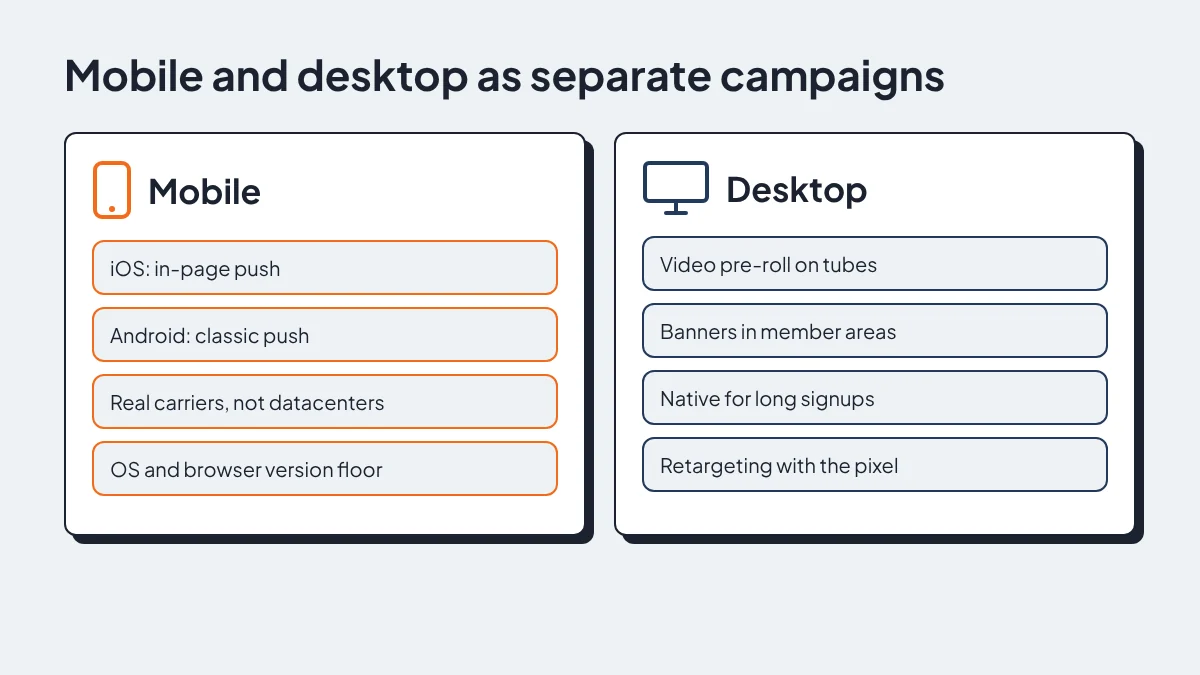
iOS and Android deserve separate campaigns because different formats reach them. Web push on an iPhone works only for sites saved to the home screen, so classic push subscriber bases are built mostly from Android and desktop browsers.
In-page push fills the iOS gap. It shows a notification-style ad inside the page with no subscription behind it, which is why AdsCompass rates it as the fit for iOS traffic and fresh sources. My default for an offer that needs iPhone users is in-page push on iOS and classic push on Android, each with its own bid.
Age-check markets break the symmetry further. Age-verification laws can remove a GEO's inventory on the day they take effect, but compliance rolls out unevenly across sites, apps and platforms, so one OS often carries inventory the others lost. Last month's report will not show you which one. Run a small OS-split test after any law change and let the numbers decide.
VPN use climbs in those same markets and distorts GEO reports. Proxy exclusion at targeting level drops detected proxy clicks before the impression is bought, which matters when the offer is priced for one country.
Carrier and ISP Targeting
Carrier targeting is the cheapest bot filter on mobile. A click that claims to be an iPhone but resolves to a hosting provider's IP range is not a phone in someone's hand. It is a server or emulator dressed as mobile, and it looks fine in impression counts and terrible in conversions.
Target real operators by name. On carrier billing offers, also set connection type to cellular, because those flows identify the subscriber through the operator network and Wi-Fi clicks rarely complete them.
Wi-Fi is not bad traffic, though. People browse on home connections, so a carrier-only whitelist on a one-click or SOI offer throws away real buyers. My middle ground:
- Allow mobile carriers and residential ISPs.
- Blacklist datacenter and hosting ISPs by name.
- Keep proxy exclusion on for every mobile campaign.
- Test IPv6 exclusion before leaving it on, since some carriers route real phones over IPv6.
Build the ISP blacklist from your own reports, not a list copied from a forum. AdsCompass supports blacklists and whitelists by IP, ISP and source ID, and reports show what each site delivered. Every site is checked before joining and bot traffic is blocked automatically, but your device filters are the second layer.
OS and Browser Versions
Old versions cluster in bot pools. Real phones update: Chrome updates through the app store, Safari moves with each iOS release, and ordinary users drift onto recent builds without trying. Emulators and device farms run whatever image they were built on, so a user agent several major versions behind is a warning sign on its own.
Set a version floor on day one. Target OS and browser with version numbers, keep the current major version plus the last few, and exclude the rest. Watch for mismatches too: a current Android build paired with a years-old Chrome rarely comes from a real handset.
Too strict a floor costs real buyers. Where people keep phones longer, older OS versions carry genuine users, so read the report by version before tightening. If an old version converts, keep it. If it only clicks, cut it.
Source IDs usually explain the pattern. When one site sends a pile of outdated user agents, blacklist it or drop it into a low bid rule with source ID bidding, and add a frequency cap per unique IP per day so one emulator cannot eat the budget.
What Desktop Traffic Is Still Good For
Video pre-roll on tube inventory is desktop's strongest case. Pre-roll buys attention before the content plays, and on a large screen that attention is hard to split with anything else. Premium offers that need a few seconds to land belong here.
Banners in member areas come next. Those slots suit branding and retargeting for known brands, and desktop layouts keep header and sidebar placements that phone layouts usually drop.
Native fits long signups. It delivers a warm in-content click for multi-step registration and paid membership, and a card form is easier to finish on a keyboard. If your funnel has more than two steps, test it on desktop before writing desktop off.
Retargeting closes the loop. The Audiences section and the SST Pixel collect visitors through auto-collection rules with a storage period per user, so a desktop visitor who left at the payment page can see a banner later. That is the desktop budget I would cut last.
A Device Setup Checklist
Run every new adult campaign through these settings before launch.
| Setting | Why it matters |
|---|---|
| Mobile and desktop split | Separate CPC, bids and reports |
| iOS and Android split | Different formats and surviving inventory |
| In-page push on iOS | Reaches users push cannot |
| Connection type: cellular | Needed for carrier billing |
| Carrier and residential ISP whitelist | Real users, not hosting IPs |
| Datacenter ISP blacklist | Cuts clicks that never convert |
| Proxy exclusion | Filters before the impression is bought |
| OS and browser version floor | Old builds cluster in bot pools |
| Frequency cap per IP per day | Stops one device eating the budget |
| Source ID bid rules | Prices each site by what it delivered |
Scaling is a separate job. Get the device split clean first, because every later decision reads from these reports.